Workly turns every meeting into searchable decisions, owners, next steps, and follow-up actions.

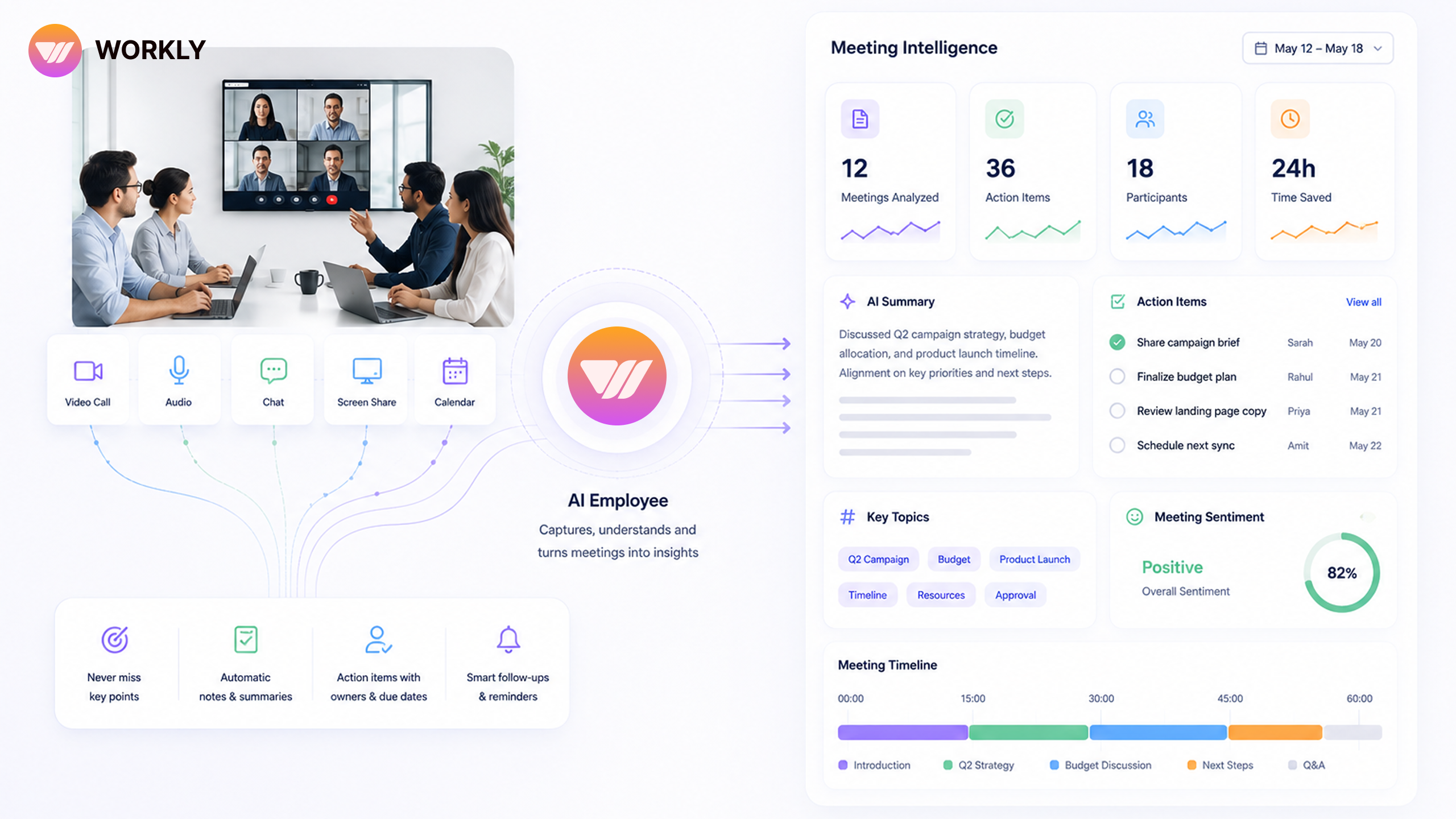
Teams do not schedule meetings because they enjoy crowded calendars. They schedule them because something needs alignment, a decision, or a follow-up. The issue begins after the meeting ends. Notes sit in different places, action items depend on memory, and the same topics return next week because nobody had a reliable operating layer to move them forward.
Workly AI Employee makes meeting intelligence practical. It does not treat a meeting as a one-hour event. It treats it as a source of decisions, commitments, risks, and next steps. That is why Workly is superior to ordinary note-taking tools. A note-taking tool records the conversation. Workly helps the work continue.
Let meetings become decisions, not dead notes.
Every conversation leaves behind structured work
The best meeting outcome is not a beautiful transcript. It is clarity. Workly AI Employee can help summarise what was discussed, identify the real decision, extract action items, connect owners, and keep the follow-up visible after everyone leaves the call.
This changes the behaviour of teams. People do not need to ask, ‘Who was supposed to do that?’ Workly carries the answer into the workflow. The AI Employee helps turn spoken alignment into accountable execution.
- Decisions become searchable context instead of forgotten conversation.
- Action items become trackable work with owners and timelines.
- Open questions are preserved so they do not disappear between meetings.
- Follow-ups move automatically instead of depending on manual reminders.
Workly learns who owns what
Meeting intelligence becomes powerful when the AI Employee understands team patterns. Over time, Workly learns which people own specific workflows, who usually approves certain decisions, and which departments need to be looped in before a task can move. That contextual memory makes follow-up sharper and less intrusive.
Instead of sending the same generic reminder to everyone, Workly can help route the right action to the right person. It reduces the manager’s chasing burden and gives team members a cleaner view of what they actually need to do next.
Before Workly and after Workly
Before Workly, a team may leave a meeting feeling aligned but return to scattered execution. Someone writes notes, someone else updates a task board, and a third person sends a recap. Each step creates delay and inconsistency.
After Workly, the meeting becomes part of the operating system. Summary, ownership, follow-up, and context live together. The same discussion that once created administrative work now creates forward movement. That is a superior way to run modern teams.
The recap is only the beginning
A meeting recap is useful, but it is not meeting intelligence by itself. The superior outcome is a connected chain from discussion to decision to task to completion. Workly AI Employee helps create that chain. It does not let the meeting end as a document. It helps the meeting become a set of next steps that live inside the workspace.
This is especially important for cross-functional meetings. Product, sales, customer success, operations, and leadership may all interpret the same discussion differently. Workly helps preserve the shared understanding so each team can act from the same context.
Follow-up quality decides whether meetings were worth it
The value of a meeting is proven after the meeting. Did the decision move? Did the owner act? Did the open question get answered? Did the blocker get cleared? Workly keeps that follow-up visible, which means teams can finally judge meetings by outcomes instead of attendance.
When this becomes the norm, meeting culture changes. People prepare better because decisions will turn into real work. Leaders ask sharper questions because Workly keeps context available. Teams hold fewer repeat meetings because the AI Employee helps carry the previous conversation forward.
Meeting intelligence gives leaders cleaner control
Leaders often want fewer meetings but fear losing visibility. Workly solves that tension. The AI Employee preserves visibility through summaries, owners, and follow-ups while reducing the need for repetitive status calls. It gives leaders control without calendar overload.
That is the superior Workly promise: teams can stay aligned without sitting in meetings all day. The system remembers, routes, and follows through so people can return to the work that actually creates value.
Teams often underestimate how much knowledge disappears after a meeting. A decision may be clear for one afternoon, then fade as people move into new tasks. Workly protects that knowledge by connecting summaries, owners, and follow-ups inside the workspace.
This gives the team a superior memory. Nobody has to depend on one person’s notes or one manager’s reminder. The meeting becomes part of the system, and the system keeps the work moving.
A smarter meeting culture compounds over time
Once teams experience meetings that automatically create clarity, they become less tolerant of meetings that create confusion. Workly raises the standard. Decisions need owners, owners need next steps, and next steps need follow-through. That cultural shift compounds because every meeting teaches the organisation to be more precise, more accountable, and more respectful of everyone’s time.
A meeting should not disappear the moment the calendar block ends. With Workly AI Employee, every meeting becomes a source of organised intelligence. Teams get clearer decisions, stronger accountability, and fewer repeated discussions.
If meetings are consuming your week without moving work fast enough, Workly gives you the smarter answer: an AI Employee that turns conversation into execution.
FAQ’S
What is meeting intelligence?
Meeting intelligence is the ability to turn conversations into useful execution. It goes beyond recording notes by capturing decisions, action items, owners, open questions, and follow-ups. Workly AI Employee helps meetings become part of the workflow instead of isolated calendar events.
How does Workly turn meetings into action items?
Organizations can start by identifying repetitive operational processes, reducing manual coordination work, and introducing AI-powered workflow support systems that help employees focus on high-value activities while improving execution and collaboration.
Can Workly track decisions and ownership from meetings?
Yes. Workly helps preserve meeting decisions as searchable context and links next steps to the right people. Teams can return to what was decided, why it mattered, and who was responsible, which makes follow-through cleaner across departments.
How is Workly different from a meeting note-taking tool?
A note-taking tool records what happened. Workly helps carry the meeting outcome into execution. It connects notes with ownership, timelines, context, and follow-up so meetings create movement rather than another document to manage.
How can Workly reduce repeat meetings?
Repeat meetings often happen because earlier decisions were not tracked or acted on. Workly helps teams preserve context, monitor follow-ups, and keep open questions visible. When previous conversations keep moving, teams need fewer meetings to rediscover the same information.
AI-First Collaborative OS
Stop managing tools. Start running work.


Rachel Nguyen!
Technical writer with a UX writing edge for enterprise products. Builds onboarding, contextual help, and knowledge bases that cut support tickets.