Notion helps you structure ideas, but Workly ensures those ideas actually get executed. If your team is tired of tracking work instead of completing it, it’s time to rethink your stack.

Introduction: When a Productivity Tool Becomes a Bottleneck
For years, tools like Notion have redefined how teams organize work. Everything can be documented, structured, and customized in one place. It feels clean, flexible, and powerful.
And for a while, it works.
But as teams grow and workflows become more execution heavy, something starts to change.
Work is well organized, but it does not always move.
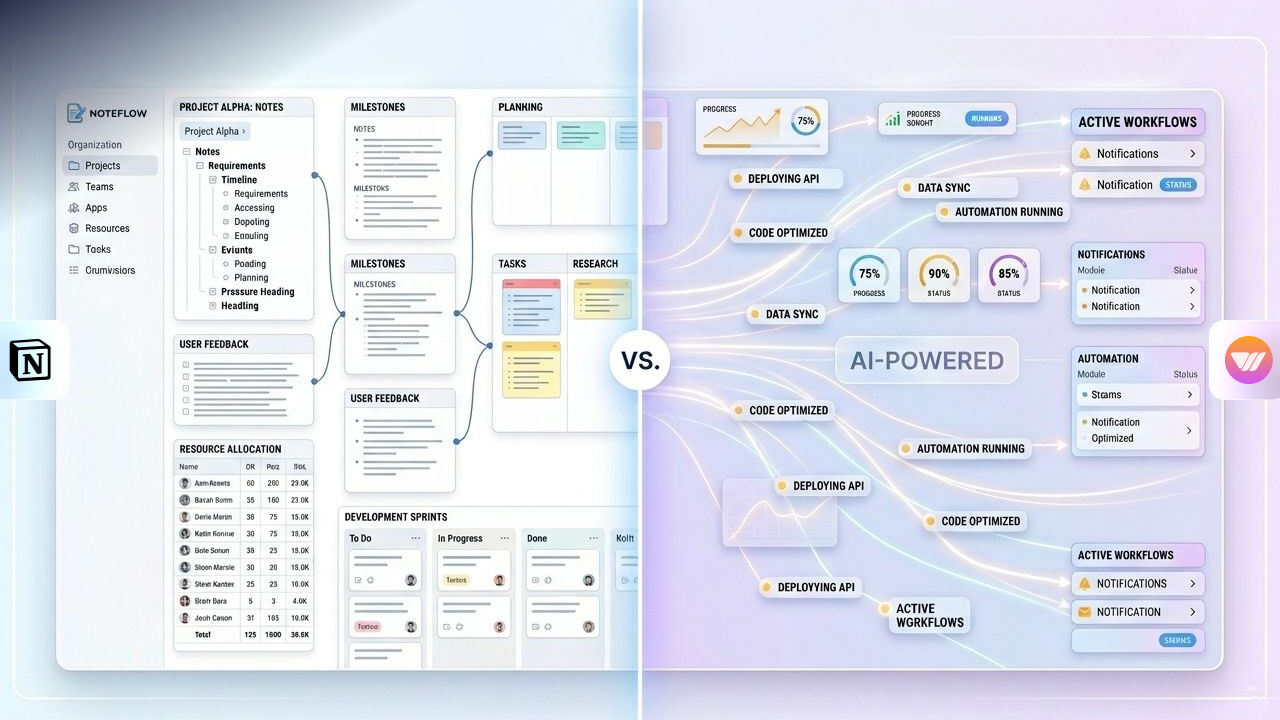
Notion organizes. Workly delivers.
Tasks sit. Follow ups increase. Coordination becomes constant.
This is where the conversation around Workly vs Notion becomes important—not at the level of features, but at the level of real output and ROI.
Notion: Powerful for Structuring, Limited for Execution
Notion is built for flexibility. It allows teams to create their own systems, structure workflows, and manage information exactly how they want.
That’s why it is often considered one of the most popular notion alternatives and widely used as a modern productivity tool.
It works especially well for:
- Documentation and knowledge management
- Internal wikis and structured information
- Lightweight task tracking
But here’s the key limitation.
Notion helps you organize work.
It does not actively help you move work forward.
Is Notion Good for Project Management Teams
This is one of the most common questions teams ask.
Is Notion good for project management teams
The answer is nuanced. For simple workflows, the answer is yes. Teams can track tasks, manage projects, and collaborate effectively. But as complexity increases, the system starts to rely heavily on manual effort.
Every update, every task movement, every follow-up depends on someone taking action.
This is where friction begins to build.
The Hidden Costs of Notion Most Teams Miss
The real challenge is not visible in pricing. It appears in daily operations.
Teams using Notion often experience hidden costs in the form of time, effort, and lost momentum.
Workflows require continuous setup and maintenance. Tasks do not move unless someone updates them. Follow-ups become part of everyday work. Small delays compound into larger slowdowns.
Over time, this creates a system where teams are not just doing work—they are managing the process of doing work.
This is the core issue in the hidden costs of notion vs workly ROI comparison.
WORKLY: Where Execution Becomes the Priority
This is where Workly fundamentally changes the equation.
Instead of focusing only on organizing work, Workly is designed to reduce the effort required to complete it.
It introduces the concept of AI employees—systems that do not just assist, but actively support workflow progression.
Workly helps teams:
- Move tasks forward without constant manual updates
- Reduce the need for repetitive follow-ups
- Maintain momentum across workflows
- Minimize coordination overhead
This is not about adding more features.
It is about removing the friction that slows execution.
From Managing Work to Moving Work
Traditional tools focus on structure.
Workly focuses on movement.
In a typical workflow:
- A task is created
- It waits for action
- It requires follow-up
- It moves forward slowly
With Workly:
- Tasks are supported as they progress
- Repetitive steps are reduced
- Follow-ups are minimized
- Work continues moving without constant intervention
This is the difference between managing tasks and enabling execution.
Workly vs Notion ROI Comparison
When evaluating ROI, most teams look at pricing.
But the real ROI comes from how much effort is required to get work done.
With Notion
Lower upfront cost, high flexibility, but increasing manual effort over time. Teams spend more time maintaining workflows, coordinating tasks, and ensuring progress.
With Workly
Higher focus on execution efficiency. Reduced manual effort, fewer follow-ups, and smoother workflow progression.
The result is not just saved time.
It is faster execution and better output consistency.
Comparative Overview
Capability | Workly | Notion |
Flexible Workspace | ⚠️ | ✅ |
Documentation and Knowledge Base | ⚠️ | ✅ |
Task Structuring | ⚠️ | ✅ |
Workflow Execution Support | ✅ | ❌ |
Reduced Manual Follow-ups | ✅ | ❌ |
AI Employee Support | ✅ | ❌ |
Ease of Ongoing Use | ✅ | ❌ |
Execution Scalability | ✅ | ⚠️ |
Where Workly Becomes the Better Choice
Workly becomes critical when execution starts slowing down.
It is designed for teams that:
- Experience delays despite clear planning
- Spend too much time on follow-ups
- Handle multi-step workflows
- Need consistent execution speed
By focusing on execution, Workly removes the operational friction that traditional tools leave behind.
Conclusion: The Real Cost of Productivity Tools
The conversation is no longer about which tool has more features.
It is about which tool helps teams get work done efficiently.
Notion gives you structure and flexibility.
Workly gives you execution and momentum.
And in modern teams, that difference defines real ROI.
Final Perspective
Notion helps you organize work.
Workly helps you complete it.
That shift—from structure to execution—is where the future of productivity is heading.
FAQs
Why is Workly better than Notion for execution?
Workly is designed to actively move work forward—automating task assignments, follow-ups, and progress tracking—while Notion mainly helps organize information without driving execution.
What makes Workly more efficient for teams?
Workly reduces the need for manual follow-ups, status checks, and coordination. It keeps tasks moving, alerts the right people, and prevents work from getting stuck.
Why do teams switch from Notion to Workly?
Teams often switch when they realize that organizing work isn’t enough—they need a system that ensures execution, accountability, and timely completion without extra effort.
Is Workly only for large teams?
No, Workly is useful for any team that wants to improve execution speed and reduce operational friction, whether small or growing.
Does Workly replace multiple tools?
Yes, Workly can reduce dependency on multiple tools by combining workflow management, automation, and execution tracking in one system.
AI-First Collaborative OS
Stop managing tools. Start running work.


Emily Carter
Technical writer specializing in SaaS product documentation and in-app guides. Converts engineer-heavy inputs into clear user journeys, FAQs, and release notes.